
Can a client see reporting without joining the workspace?
Authorised managers can prepare dashboard-share links with scope, expiry and access controls. Inspect the intended client view before distributing a link.
Review agent work in the context of the client brief, reporting period and agreed outcomes. Prospexe brings agent and project dashboards together with prospect history, follow-up and scoped client-facing reporting.
Project reporting shows total records, called and uncalled records, callbacks including overdue and upcoming callbacks, outcome distribution, daily calls and an hourly activity heatmap. Use the selected dates, access scope and campaign outcome definitions when interpreting these figures.
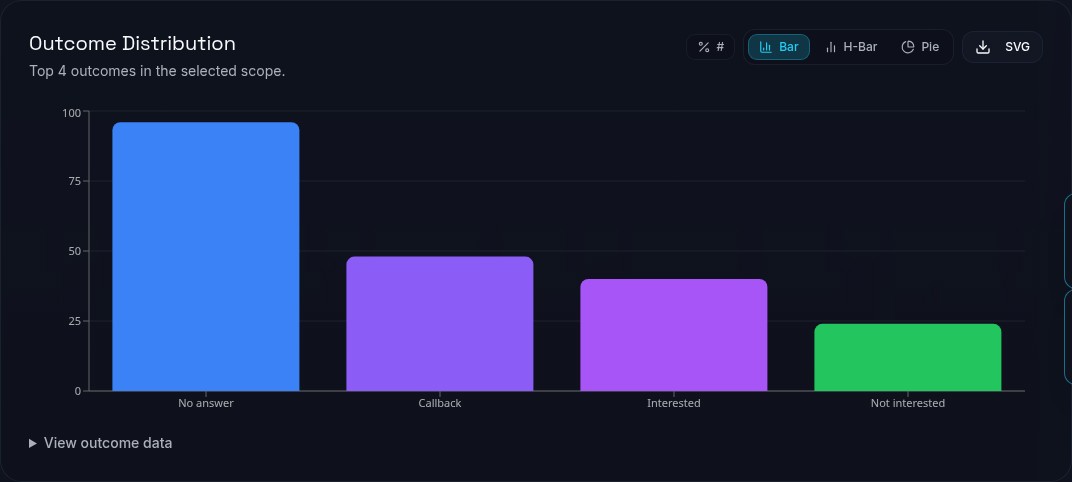
Start with the campaign brief and its outcome definitions. An appointment-setting campaign and a qualification campaign can count progress differently. Decide which outcomes answer the client's question before comparing activity or discussing performance.
Choose the reporting period and the agent or project scope available to your role. Different list sources, campaign stages and assignments affect the work behind a figure. A higher call count alone does not prove better performance.
Prospect history, recorded outcomes, ownership and callbacks provide context alongside dashboard figures. Managers can connect campaign totals to the conversations and next actions behind them.
When a callback passes to another agent, the recorded history supports the handover. Reporting periods and campaign outcome definitions keep comparisons tied to the work being reviewed.
Authorised managers can create branded dashboard-share links for client reporting. Choose the intended project scope and review expiry and access settings, including password protection where configured.
A fixed-project share keeps the report scoped to the selected projects, so a client can review their work without joining the workspace.
An all-project share has a broader audience boundary than a fixed selection and requires the appropriate global permission. Review whether a fixed set of projects better matches the client's entitlement. Revisit the link when a brief ends or access changes.
Dashboard viewing, exports and share links have separate permissions. Being able to view a figure does not automatically grant permission to export it.
Agent-performance exports are manager-only. Project access and applicable action permissions determine the authorised scope.
Agree how exported files and shared links will be handled after delivery. The person preparing a client report remains responsible for choosing data the recipient is entitled to see.
A useful review might identify unclear outcomes, missed callback context or a need to revisit assignments. Record the operational question and inspect the relevant workflow with the team before attributing a cause to the dashboard.
Reporting supports operational decisions; it does not guarantee a connect rate, cost per lead or productivity improvement. Custom work remains subject to an agreed scope.
Authorised managers can prepare dashboard-share links with scope, expiry and access controls. Inspect the intended client view before distributing a link.
No. Agent-performance exports are manager-only, and authorised scope and action permissions still apply. Viewing a dashboard is not the same as having export permission.
Do not assume so. Compare briefs, list sources, campaign stages and outcome definitions first. Agree a baseline appropriate to the work; this page supplies no universal performance benchmark.
No. The manager must choose and verify the intended scope, expiry and access settings. Check the recipient's view and review access when the brief changes or ends.