Dial and Go previews each record and counts down before automatically calling its best available number. Agents have time to review the prospect before the call starts. Manual browser calls and configured parallel calling are also available.
This silent 26-second walkthrough uses the actual interface with fictional data. Dial and Go previews the next eligible record, counts down, then automatically calls its best available number: mobile when available, otherwise phone. Review time is configurable. This example uses ten seconds. No provider is connected here, so no call is placed.
Read the Dial and Go clip description
0–2 seconds: branded introduction. 2–6: the genuine start dialog; Start loads the next eligible record. 6–16: a fictional contact, both numbers, and the real ten-second review countdown with Pause, Skip and Stop. Review time is configurable. Mobile is preferred; otherwise Dial and Go selects the phone number. 16–19: the countdown ends and the genuine dialler opens with the fictional mobile selected. No call is placed. 19–26: the actual paused session and selected number remain visible; no provider is connected and no connection is simulated.
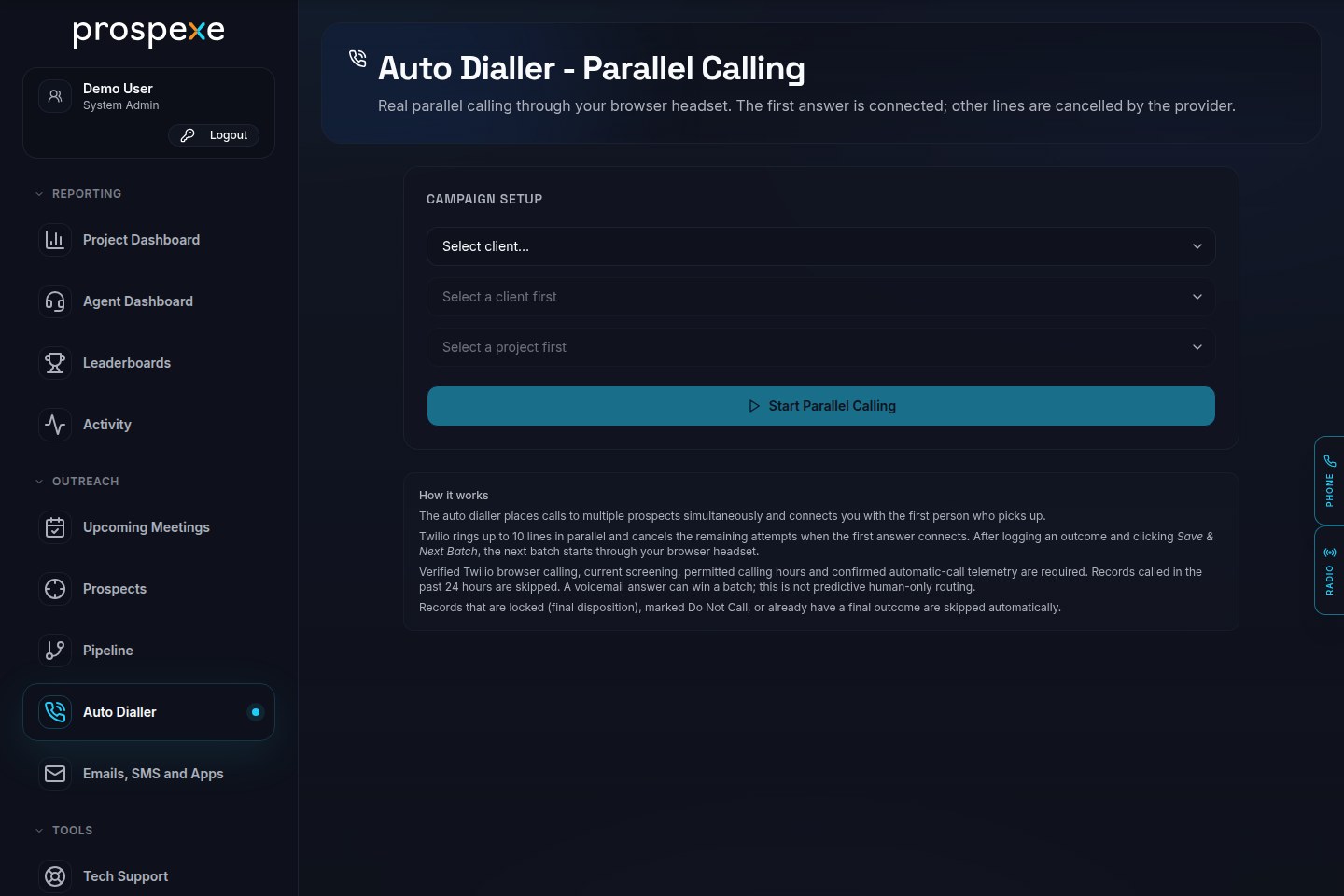
Parallel calling setup
Choose the client, project and campaign before starting parallel calling. Calling stays subject to provider readiness, screening and available answer-risk headroom.
Parallel calling setup in Prospexe. Fictional demonstration workspace; no calls placed.Fictional demonstration data.
TPS, CTPS and UK calling windows
Before an outbound call, Prospexe requires current clear results for both TPS and CTPS from a licensed screening workflow. Missing, expired or non-clear results block calling. Consent notes do not override that block.
Campaign calling windows use a named timezone and selected weekdays. The default is 09:00–20:00, Monday to Saturday, in Europe/London; an agency’s narrower calling hours also apply. These are product settings, not a statement of legally permitted calling hours. Your organisation must establish appropriate rules for its campaigns.
Silent and abandoned calls
Parallel calling can produce more answers than an agent can take. Prospexe connects one winning answer; voicemail can win that slot. If another answered leg reaches the screening callback when no agent is available, the configured identity message gives a callback number before ending the call. This does not guarantee that every recipient hears a message or that silent calls cannot occur.
Automatic calling is stopped when answer telemetry is incomplete or the configured abandonment limit is reached. Parallel batches also require headroom for additional simultaneous answers. These internal controls do not establish a legally acceptable abandonment rate.
Ofcom’s January 2026 guidance says organisations should take steps to prevent silent and abandoned calls. Review dialler settings, staffing and actual recipient experience with your compliance adviser before live use. This explanation is not legal approval of a campaign.
Manual browser-headset calling lets an agent open a prospect, read its history and choose when to start the call. The outcome, qualification information and next callback stay with the record for the next authorised agent.
Calling requires microphone permission, a working headset, a configured telephony provider and the relevant workspace permissions.
Work through a list with sequential Dial and Go
Dial and Go opens the next prospect record for preview and starts a configurable countdown. When the countdown ends, it automatically calls the best available number on the record: mobile first, otherwise the phone number.
Agents can review the prospect before the call, pause or skip a record, then record the outcome and arrange any follow-up before continuing.
Review each prospect before the automatic call.
Pause or skip a record during the countdown.
Save the outcome and next action with the prospect.
Make parallel calls with campaign controls
Configured parallel calling through Twilio can ring up to 10 lines and connect the first answer to the agent's browser headset, cancelling the other attempts. A voicemail answer can take that place; answer classification does not guarantee a human connection. The line limit is a capability, not a recommended setting or a prediction of connected conversations.
Campaign selection and session controls keep parallel calling tied to the work assigned to the agent. Provider setup, agent availability, campaign rules and operational readiness determine whether this mode can be used.
Include return calls and saved conversation context
Configured inbound channels support return calls alongside outbound work. Live captions and saved transcripts can preserve conversation context where enabled.
Inbound handling, captions and transcripts depend on provider setup, permissions and workspace readiness. Recording and transcription are not automatically enabled for every call; the agency controls their use and retention responsibilities.
Establish UK campaign responsibilities before rollout
The operator must establish lawful contact use, applicable screening, campaign exclusions and the rules for recording or transcription. Prospexe is not a compliance certification, and the presence of a dialling control does not make a campaign lawful.
Connected-provider charges are paid directly to the provider. Calling capacity does not imply a guaranteed connect rate, call volume or productivity improvement.
What is the difference between manual and sequential calling?
Manual calling starts when an agent chooses to call from a record. Sequential Dial and Go previews the next record and starts a configurable countdown, then automatically calls its best available number: mobile first, otherwise the phone number. Agents can pause or skip during the preview and keep outcomes and follow-up in the workspace.
Does parallel calling always use 10 lines?
No. Up to 10 lines is a configured capability, not a required setting. Provider readiness, available agents, campaign rules and operating checks must be established before use.
Will every call have a transcript?
No. Captions and saved transcripts depend on the provider and workspace configuration, permissions and operational readiness. Agree the applicable recording or transcription responsibilities before enabling them.
Does the dialler replace our UK compliance review?
No. The operator remains responsible for lawful contact use, applicable screening, exclusions and recording or transcription rules. Software features are not legal advice or certification.